
The making of Segmentis - ProtoSegmentis
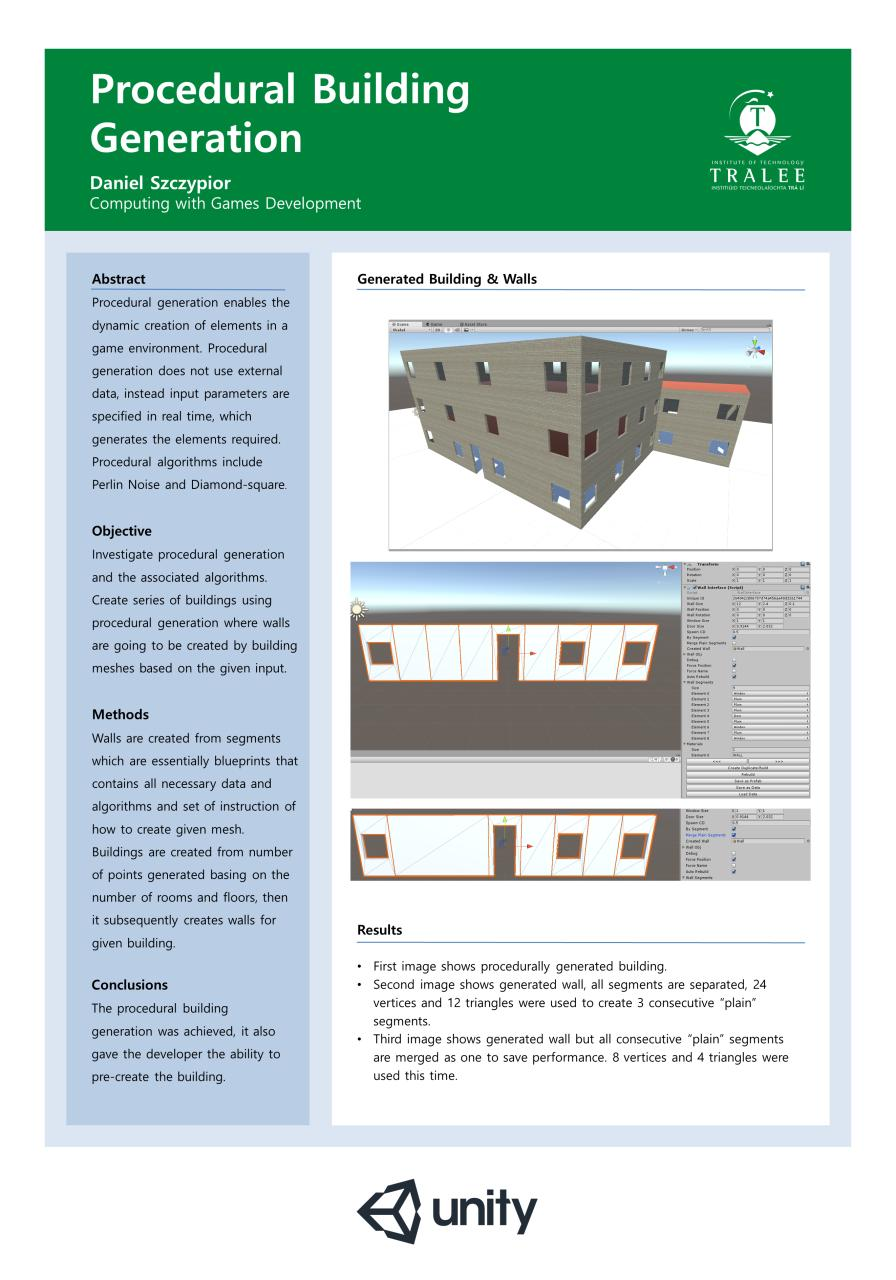
Proto-segmentis was unity prototype for procedural building generation that I started in Unity in 2018. The thesis gave me room to work through the math and try the idea in a prototype.
Segmentis allowed creators to generate buildings either via code or in the Unity Editor. A level designer could place walls similarly to mechanics in The Sims to create custom structures.
No Pre-existing Mesh Components: Generated wall meshes programmatically by computing vertices, triangles, and normals.
Segmented Architecture: Walls consisted of plain segments or integrated window/door components.
Mesh Merging Optimization: Merged sequential plain walls to optimize draw calls.
Runtime Editing & Serialization: Supported saving generated meshes and editing them in real-time.
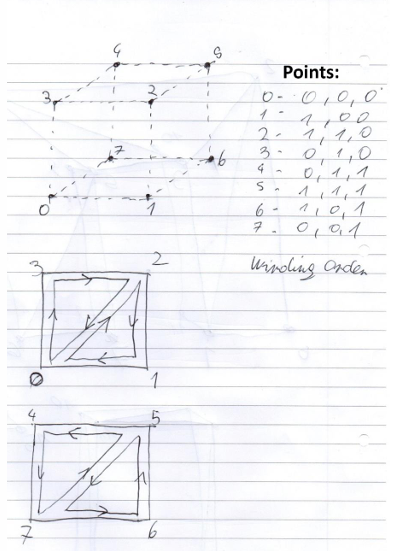
Example of Vertices and Triangle calculation:
The process of calculation of vertices and triangles is straightforward. First draw object to clearly
shows points, number them correctly. Then assigns vector 3 to each of points with the range from 0
to 1 for easier reading. For triangle use anticlockwise winding order (In the images below arrows
show order of points, starting point does not matter but it is preferred to start either from 0 or from
right top).
Later points need to be translated so they can be resized basing on expected size. To achieve this
following base formula is used: 0 = (-SegmentSize. * 0.5f)
1 = (SegmentSize. * 0.5f)
0.25f = (-SegmentSize. * 0.5f)
0.75f = (SegmentSize. * 0.5f)
0.1f = (SegmentSize. * 0.5f) for front
And 0.1f = -(SegmentSize. * 0.5f) for back
Afterwards add + SegmentPosition.x for x, + SegmentPosition.y for y and + SegmentPosition.z for z
For segment with doors (DoorSize.x) etc. needs to be added in vertices responsible for doors e.g.
points number 1, 3, 5, 7 and for segment with window (WindowSize.x) needs to be added for vertices
numbered 1, 3, 5, 7.
Triangles:2, 1, 0,
2, 0, 3,
4, 7, 6,
6, 5, 4,
Point Translation:
0 – ((-SegmentSize.x * 0.5f) + SegmentPosition.x, (SegmentSize.y * 0.5f) + SegmentPosition.y, (SegmentSize.z * 0.5f) +
SegmentPosition.z),
1 - ((SegmentSize.x * 0.5f) + SegmentPosition.x, (SegmentSize.y * 0.5f) + SegmentPosition.y, (SegmentSize.z * 0.5f) +
SegmentPosition.z),
18
Daniel Szczypior
2- ((SegmentSize.x * 0.5f) + SegmentPosition.x, (-SegmentSize.y * 0.5f) + SegmentPosition.y, (SegmentSize.z * 0.5f) +
SegmentPosition.z),
3 - ((-SegmentSize.x * 0.5f) + SegmentPosition.x, (-SegmentSize.y * 0.5f) + SegmentPosition.y, (SegmentSize.z * 0.5f) +
SegmentPosition.z),
4 - ((SegmentSize.x * 0.5f) + SegmentPosition.x, (SegmentSize.y * 0.5f) + SegmentPosition.y, (-SegmentSize.z * 0.5f) +
SegmentPosition.z),
5 - ((-SegmentSize.x * 0.5f) + SegmentPosition.x, (SegmentSize.y * 0.5f) + SegmentPosition.y, (-SegmentSize.z * 0.5f) +
SegmentPosition.z),
6 - ((-SegmentSize.x * 0.5f) + SegmentPosition.x, (-SegmentSize.y * 0.5f) + SegmentPosition.y, (-SegmentSize.z * 0.5f) +
SegmentPosition.z),
7 - ((SegmentSize.x * 0.5f) + SegmentPosition.x, (-SegmentSize.y * 0.5f) + SegmentPosition.y, (-SegmentSize.z * 0.5f) +
SegmentPosition.z)
Window segment:
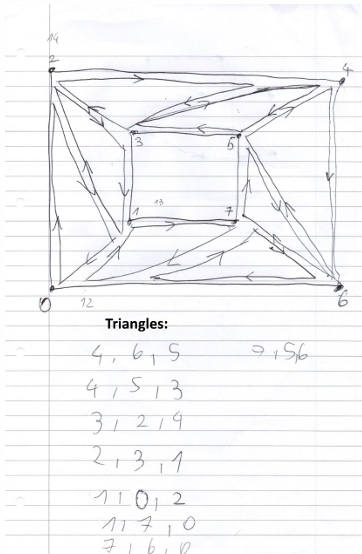
Points: 0 - (0, 0, 0)
1 - (0.25, 0.25, 0)
2 - (0, 1, 0)
3 - (0.25, 0.75, 0)
4 - (1, 1, 0)
5 - (0.75, 0.75, 0)
6 - (1, 0, 0)
7 - (0.75, 0.25, 0)
Point Translation:
0 - ((-SegmentSize.x * 0.5f) + SegmentPosition.x, (-SegmentSize.y * 0.5f) + SegmentPosition.y, (-SegmentSize.z * 0.5f) +
SegmentPosition.z)
1 - ((-WindowSize.x * 0.5f) + SegmentPosition.x, (-WindowSize.y * 0.5f) + SegmentPosition.y, (-SegmentSize.z * 0.5f) +
SegmentPosition.z)
2 - ((-SegmentSize.x * 0.5f) + SegmentPosition.x, (SegmentSize.y * 0.5f) + SegmentPosition.y, (-SegmentSize.z * 0.5f) +
SegmentPosition.z)
3 - ((-WindowSize.x * 0.5f) + SegmentPosition.x, (WindowSize.y * 0.5f) + SegmentPosition.y, (-SegmentSize.z * 0.5f) +
SegmentPosition.z)
4 - ((SegmentSize.x * 0.5f) + SegmentPosition.x, (SegmentSize.y * 0.5f) + SegmentPosition.y, (-SegmentSize.z * 0.5f) +
SegmentPosition.z)
5 - ((WindowSize.x * 0.5f) + SegmentPosition.x, (WindowSize.y * 0.5f) + SegmentPosition.y, (-SegmentSize.z * 0.5f) +
SegmentPosition.z)
6 - ((SegmentSize.x * 0.5f) + SegmentPosition.x, (-SegmentSize.y * 0.5f) + SegmentPosition.y, (-SegmentSize.z * 0.5f) +
SegmentPosition.z)
7 - ((WindowSize.x * 0.5f) + SegmentPosition.x, (-WindowSize.y * 0.5f) + SegmentPosition.y, (-SegmentSize.z * 0.5f) +
SegmentPosition.z)
Door segment:
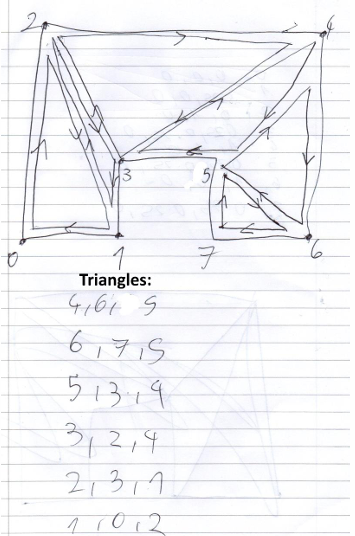
Points:
0 - (0, 0, 0)
1 - (0.25, 0, 0)
2 - (0, 1, 0)
3 - (0.25, 0.25, 0)
4 - (1, 1, 0)
5 - (0.75, 0.25, 0)
6 - (1, 0, 0)
7 - (0.75, 0, 0)
Point Translation: 0 - ((-SegmentSize.x * 0.5f) + SegmentPosition.x, (-SegmentSize.y * 0.5f) + SegmentPosition.y, (-SegmentSize.z * 0.5f) +
21
SegmentPosition.z)
Daniel Szczypior
1 - ((-DoorSize.x * 0.5f) + SegmentPosition.x, (-SegmentSize.y * 0.5f) + SegmentPosition.y, (-SegmentSize.z * 0.5f) +
SegmentPosition.z)
2 - ((-SegmentSize.x * 0.5f) + SegmentPosition.x, (SegmentSize.y * 0.5f) + SegmentPosition.y, (-SegmentSize.z * 0.5f) +
SegmentPosition.z)
3 - ((-DoorSize.x * 0.5f) + SegmentPosition.x, (-SegmentSize.y * 0.5f) + (DoorSize.y) + SegmentPosition.y, (-SegmentSize.z *
0.5f) + SegmentPosition.z)
4 - ((SegmentSize.x * 0.5f) + SegmentPosition.x, (SegmentSize.y * 0.5f) + SegmentPosition.y, (-SegmentSize.z * 0.5f) +
SegmentPosition.z)
5 - ((DoorSize.x * 0.5f) + SegmentPosition.x, (-SegmentSize.y * 0.5f) + (DoorSize.y) + SegmentPosition.y, (-SegmentSize.z *
0.5f) + SegmentPosition.z)
6 - ((SegmentSize.x * 0.5f) + SegmentPosition.x, (-SegmentSize.y * 0.5f) + SegmentPosition.y, (-SegmentSize.z * 0.5f) +
SegmentPosition.z)
7 - ((DoorSize.x * 0.5f) + SegmentPosition.x, (-SegmentSize.y * 0.5f) + SegmentPosition.y, (-SegmentSize.z * 0.5f) +
SegmentPosition.z)
Example of UV map calculation
Calculation of UV map is similar to calculation of vertices albeit with some difference. UV map uses
Vector 2 since it is 2d so z-axis from vertices is skipped. Each vertices needs to have calculated UV
point for it. Since it take into account position of the segment all segments placed near each other
have perfect tiling that takes into account previous segment, when altering wall position it can be
observed that textures stays in place while wall moves, this makes that wall have no visible seams
and everything looks nice.
Plain segment: 0 - ((-SegmentSize.x * 0.5f) + SegmentPosition.x , (SegmentSize.y * 0.5f) + SegmentPosition.y),
1 - ((SegmentSize.x * 0.5f) + SegmentPosition.x, (SegmentSize.y * 0.5f) + SegmentPosition.y),
2 - ((SegmentSize.x * 0.5f) + SegmentPosition.x, (-SegmentSize.y * 0.5f) + SegmentPosition.y),
3 - ((-SegmentSize.x * 0.5f) + SegmentPosition.x, (-SegmentSize.y * 0.5f) + SegmentPosition.y),
4 - ((SegmentSize.x * 0.5f) + SegmentPosition.x, (SegmentSize.y * 0.5f) + SegmentPosition.y),
5 - ((-SegmentSize.x * 0.5f) + SegmentPosition.x, (SegmentSize.y * 0.5f) + SegmentPosition.y),
6 - ((-SegmentSize.x * 0.5f) + SegmentPosition.x, (-SegmentSize.y * 0.5f) + SegmentPosition.y),
7 - ((SegmentSize.x * 0.5f) + SegmentPosition.x, (-SegmentSize.y * 0.5f) + SegmentPosition.y)
Window Segment: 0 - ((-SegmentSize.x * 0.5f) + SegmentPosition.x, (-SegmentSize.y * 0.5f) + SegmentPosition.y),
1 - ((-WindowSize.x * 0.5f) + SegmentPosition.x, (-WindowSize.y * 0.5f) + SegmentPosition.y),
2 - ((-SegmentSize.x * 0.5f) + SegmentPosition.x, (SegmentSize.y * 0.5f) + SegmentPosition.y),
3 - ((-WindowSize.x * 0.5f) + SegmentPosition.x, (WindowSize.y * 0.5f) + SegmentPosition.y),
4 - ((SegmentSize.x * 0.5f) + SegmentPosition.x, (SegmentSize.y * 0.5f) + SegmentPosition.y),
5 - ((WindowSize.x * 0.5f) + SegmentPosition.x, (WindowSize.y * 0.5f) + SegmentPosition.y),
6 - ((SegmentSize.x * 0.5f) + SegmentPosition.x, (-SegmentSize.y * 0.5f) + SegmentPosition.y),
7 - ((WindowSize.x * 0.5f) + SegmentPosition.x, (-WindowSize.y * 0.5f) + SegmentPosition.y),
Door Segment: 0 - ((-SegmentSize.x * 0.5f) + SegmentPosition.x, (-SegmentSize.y * 0.5f) + SegmentPosition.y),
1 - ((-DoorSize.x * 0.5f) + SegmentPosition.x, (-SegmentSize.y * 0.5f) + SegmentPosition.y),
2 - ((-SegmentSize.x * 0.5f) + SegmentPosition.x, (SegmentSize.y * 0.5f) + SegmentPosition.y),
3 - ((-DoorSize.x * 0.5f) + SegmentPosition.x, (-SegmentSize.y * 0.5f) + (DoorSize.y) + SegmentPosition.y),
4 - ((SegmentSize.x * 0.5f) + SegmentPosition.x, (SegmentSize.y * 0.5f) + SegmentPosition.y),
5 - ((DoorSize.x * 0.5f) + SegmentPosition.x, (-SegmentSize.y * 0.5f) + (DoorSize.y) + SegmentPosition.y),
6 - ((SegmentSize.x * 0.5f) + SegmentPosition.x, (-SegmentSize.y * 0.5f) + SegmentPosition.y),
7 - ((DoorSize.x * 0.5f) + SegmentPosition.x, (-SegmentSize.y * 0.5f) + SegmentPosition.y),
Building Algorithm
At first set of random points is generated basing on the given criteria e.g. required number of floors,
number of rooms per floor etc. Each point is labelled with number starting from 0. The assumption
bade here is that points produce some sort of net (rectangular e.g. horizontal neighbour points must
match same axis, same goes for vertical (this makes sure that rooms going to be in the shape of
rectangle)). Below Example of generated net.
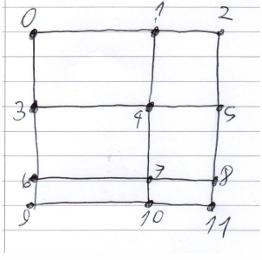
It will then proceed to randomly connect points to generate rooms with the constraint that rooms
needs to be rectangular in shape e.g. point 0, 1, 3, 4 are good but 0, 1, 7, 3 are not.
To find which wall is external and which is not is easy, walls can be generated only on this net so it is
know that 0, 1 and 2 will always be external wall so it should have windows and door if building has
none.
The image below show example of generated rooms. Each colour is for different room. There is no
wall between points 6 and 7.
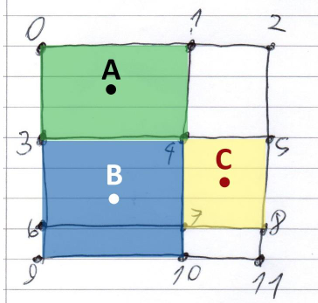
It knows that this building basing on the generated rooms can have windows only on given walls,
because this walls have no other walls higher than them e.g. there is no point that is above 0, or
below 9, neither on the left of 3 or on the right of 5 etc.
1. 0, 1
2. 1, 4
3. 4, 5
4. 5, 8
5. 8, 7
6. 7, 10,
7. 10, 9
8. 9, 3
9. 3, 0
What left is now to find which wall should have doors. One thing that can be observed on the image
below is that in centre of the room is dot, this is centre point that is used to determine which room is
above or on left or right each, it is there to simplify calculations. It is know that each room labelled A,
B and C needs door. It will use reachability algorithm to find which room allows to reach other rooms
and will place door on given wall. It knows that to reach B from A it needs to create door somewhere
on the 3, 4 wall. To go from C to B on 4, 7 wall and to get inside of the building it can generate
additional door on the same walls that can have windows. This way it is possible to extinguish which
wall is external and which is internal, by comparing points to other points on the net.
The rest and entire development can be seen at https://github.com/DanScallion/Proto-Segmentis